
From Design to Live Site: How Figma-to-WordPress Conversion Saves Time and Money
Modern businesses can’t afford slow website development cycles anymore. Every delayed launch equals lost leads, lost sales, and lost market presence. It’s why the conversion from Figma to WordPress has become one of the best workflows in modern web development.
Design and development are no longer isolated groups fighting through protracted revision cycles. Instead, the current digital marketplace is quite competitive, and those organizations that go for competent WordPress conversion service providers are earning major operational benefits.
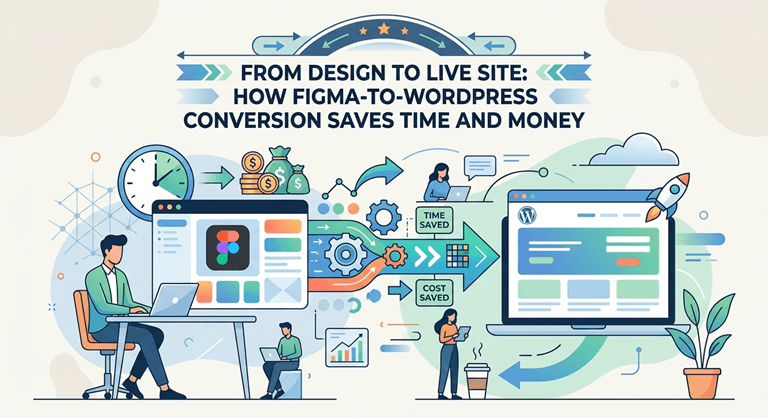
How Figma-to-WordPress Conversion Benefits Your Business
Fast Development by Direct Design Translation
As the PSD to WordPress services are seamless, the transition process is smooth. Here, your developer directly accesses all the files and provides your website with all the pre-finalized elements, including:
- Design system elements
- Exportable Resources (like typographics, responsive behavior options, spacing values, and so on)
- Reusable components, including Buttons and customer reviews.
Immediate Access to Design Resources
Developers can export right away:
- Scalable Vector Graphics (SVG) icons
- Optimized pictures
- Font details
- Color Codes.
- CSS property
- Grid layouts
This saves hours of manual extraction effort and greatly speeds up development time. Rather than having to reconstruct every image individually, the PSD to WordPress services team simply works off a simple plan.
Reusable Components Save Much Time
Today’s WordPress builders allow developers to design reusable parts that function like Figma components. For instance:
- Buttons
- Customer reviews
- Product cards
- Hero portions
- Contact forms
These components can thoroughly be used in the website without rebuilding it from scratch. Using this systematic technique, a skilled PSD to WordPress services provider scales massive websites much faster.
Parallel Workflows Boost Productivity
One of the main benefits of Figma-based processes is that teams can operate in parallel. For example,
- Designers fine-tune layouts
- The developer develops the code
- The marketing teams develop the content
- SEO professionals tune metadata
- Landing pages are built by copywriters
This is done concurrently, reducing the overall project time frame and improving operational efficiency. There are no weeks of waiting between stages. Many departments work together, like the gears of a high-performance machine.
Lower Development Costs Through Improved Accuracy
“Time is money” in web development. Every change you request adds billable hours to the project. This simplified WordPress conversion service helps eliminate these unwanted costs by improving accuracy from the very beginning.
Developers may see accurate metrics directly in Figma, including:
- Profit Margins
- Filling
- Font Size
- Alignment of items
- Color values
- Answerability
This accuracy reduces the trial-and-error changes that usually take up a lot of development time. The lower the total project cost, the fewer repairs necessary.
Shorter QA and Testing Cycles
Traditional website projects can be tedious in terms of quality assurance because the authorized design is not the same as the live website. With the Figma to WordPress conversion, you can ensure:
- Fewer visual bugs
- Speedier approvals
- Fewer browser inconsistencies
- Improved mobile responsiveness
And during the design phase, the blueprint is validated so that testing is easier.
Less Plugin Dependencies
Badly designed WordPress sites depend on dozens of plugins to achieve what design should do. This leads to:
- Sites that are slower
- Security Threats
- Additional Licensing Fees
- Ongoing compatibility problems
But bespoke development from Figma layouts allows developers to write only what is really needed. This cleaner architecture decreases plugin bloat and reduces long-term maintenance costs.
Better Collaboration
Website delays are rarely down to the coding alone. “The delays are mostly in communication.
Figma does this by offering a central place to work together.
Real Time Feedback Design-In
No more dispersed email threads and interminable screenshots. Stakeholders may offer comments directly in the design interface.
This gives us:
- Quicker approvals
- Better communication
- Enhanced versioning
- Fewer Misunderstandings
Everyone is working off the same single source of truth.
More Time to Promote Business
Business moves quickly. That’s why you cannot waste so much time developing parts. Here, the Figma to WordPress conversion saves your time, so that you can use it to:
- Reach customers fast
- Launch marketing efforts earlier
- Early conversion optimization improvement
- Minimize operating delays
- Get ahead of competitors
Therefore, businesses often partner with a skilled WordPress design company. This way you will get the expert support who knows extensively how to finish the work within the time. So, there is no room for trial and error, just meaningful work that will help you to bring business in the future.
Closing Thoughts
The website’s look is not the ultimate decision-making factor; you also need to keep in mind the workflow. As we discuss in this blog, the Figma to WordPress development workflow not only minimizes the effort but also reduces the cost in so many ways. So, next your turn to find a professional WordPress conversion service provider and ask them to get a full Figma to WordPress solution. They will give you a bespoke solution that matches your requirements perfectly.
Popular on OTW Right Now!


About The Author

Gagan Bhangu
Founder of otechworld.com and managing editor. He is a tech geek, web-developer, and blogger. He holds a master's degree in computer applications and making money online since 2015.